

dsh-cyberpunk-theme · DSH 赛博朋克 2077 主题
把 DeepSeek Harness(DSH)整个界面换成《赛博朋克 2077》夜之城风格的深度定制主题——霓虹配色、CRT 氛围、流动彩带、故障闪烁、全局切角 UI、输入框下方的实时状态条,还带一个独立的设置页和主题总开关。
以 标准 DSH bundle 插件 分发(dsh plugin add一行安装,刷新/重启都不丢),同时保留 动态 Cordis 插件 形式(30 秒快速体验,零配置)。
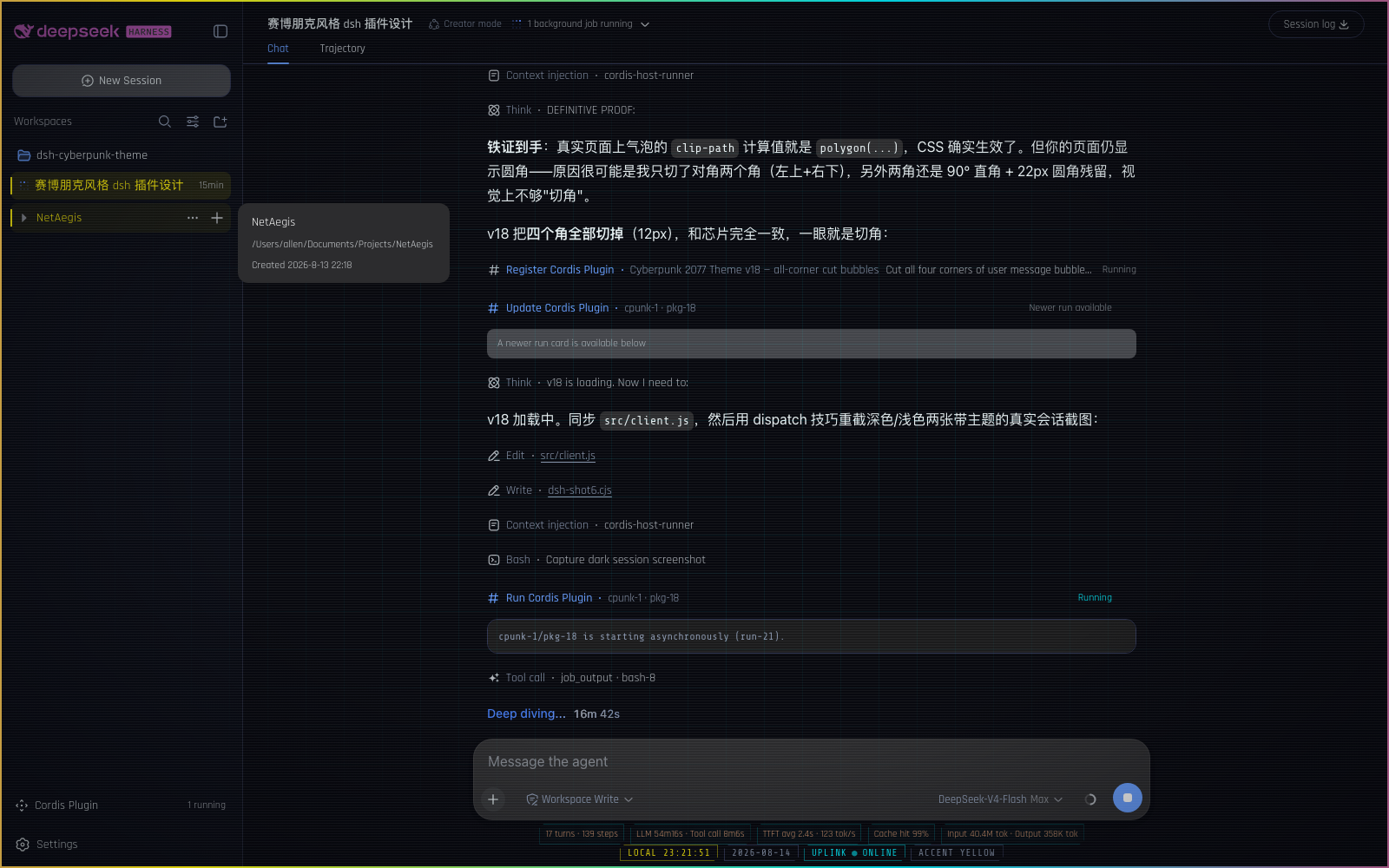
📸 效果预览
| 🌃 夜之城(暗色) | 🏙 荒坂(亮色) |
|---|---|
 |
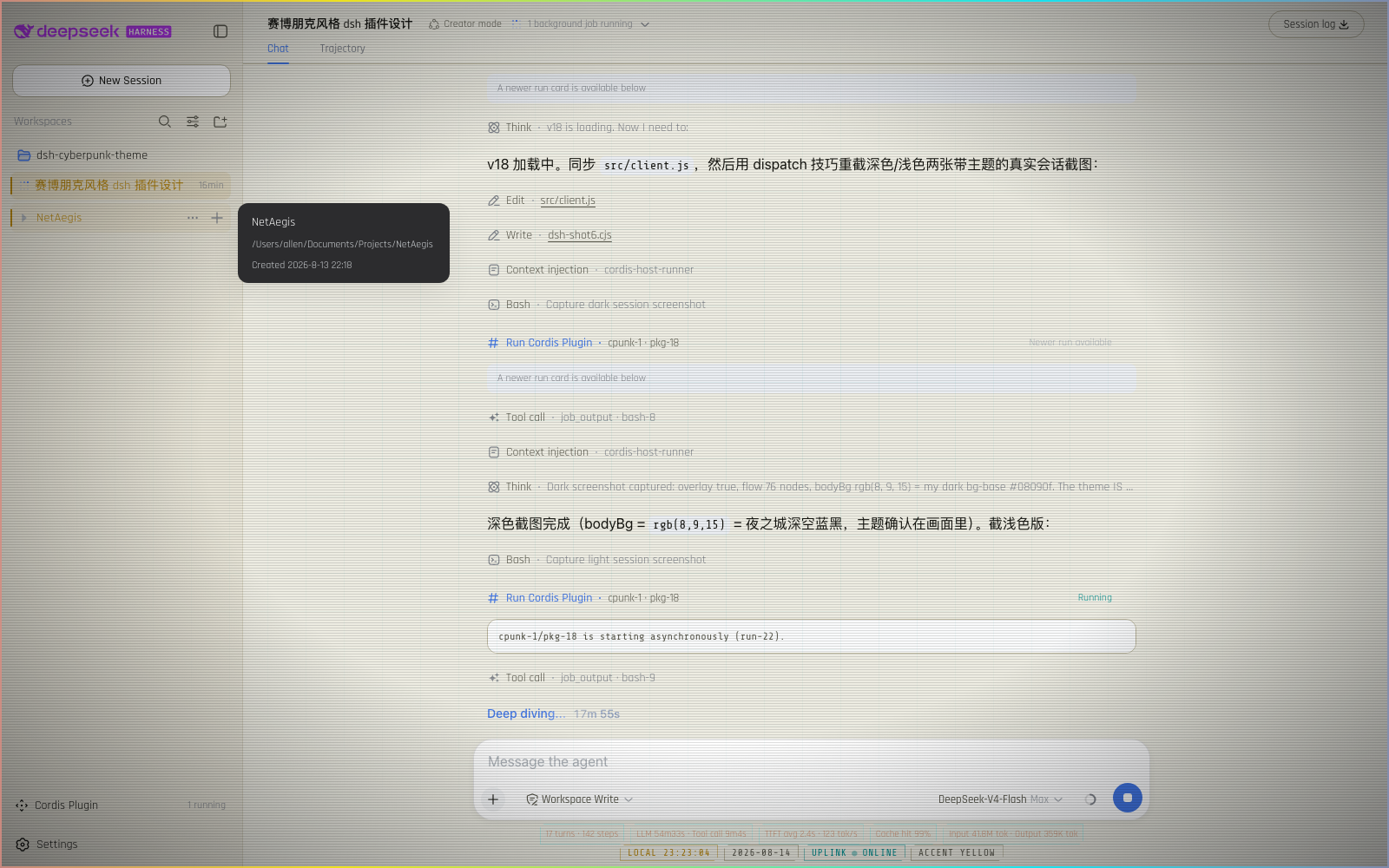 |
截图来自启用主题后的真实 DSH 会话——暗色模式下霓虹效果最完整。
🚀 安装(三选一,按你的场景挑)
方式一:让 DSH 的 Agent 帮你装 —— 零复制(最省事)
如果你在用带 Agent 的 DSH 会话(比如你现在正在看的这个界面),什么都不用复制,直接说一句话:
「安装 cyberpunk 2077 主题:client 代码在
<仓库路径>/src/client.js,host 代码在<仓库路径>/src/host.js,帮我创建动态插件并运行」
Agent 会读取仓库代码、自动完成 cordis_define + cordis_run。之后刷新页面主题消失时,同样一句话让 Agent 重新运行即可恢复。
方式二:dsh plugin add 安装,永久生效(推荐正式使用)
把主题装成 DSH 的正式组合插件(bundle):浏览器端由 client module system 以 /plugins/dsh-cyberpunk-theme/client.js 服务,刷新不丢、重启不丢。
git clone https://github.com/ai7603/dsh-cyberpunk-theme(或直接下载 zip 解压)。仓库已包含构建好的lib/index.js+lib/client.js,直接安装即可;只有改过源码才需要pnpm install && pnpm build重建;- 在你的 DSH checkout 里执行:
pnpm dsh plugin --profile web add /path/to/dsh-cyberpunk-theme
# 或: pnpm dsh plugin --profile <你的 profile> add <本地路径>- 重启该 web profile(plugin-set 变更按设计需要重启):
pnpm dsh web安装命令会识别 package.json 的 dsh.bundle.patch,把本包追加到 dsh.profile.bundles;其 cordis.patch.yml 自动向组合树插入 id: cyberpunk-2077 / name: dsh-cyberpunk-theme 行。验证可用 pnpm dsh web --dump-config 看到该行,页面打开后设置里应出现 Cyberpunk 2077 分区。
💡 不需要改动 DSH 源码/workspace:
lib/是本包的产物目录,host 端是合法的 no-op loader entry,浏览器端是标准dsh.clientbundle。详见「🔩 怎么做到的」。
方式三:30 秒快速体验(动态插件,刷新会消失)
想在不改任何配置的情况下先看效果?用 DSH 的动态 Cordis 插件:
- 在 DSH Web 界面发起创建动态插件(
cordis_define,idPrefix如cpunk)。 - 把下面的 Host 代码 粘贴到 host 栏(一个超小的
ping心跳服务):
  return {
    apply(ctx) {
      ctx.effect(function () {
        return harness.handle('ping', function () {
          return { ok: true, ts: Date.now() }
        })
      })
    },
}- 把下面的 Client 代码 粘贴到 client 栏(主题本体:配色 token、全部 CSS、氛围层、状态条、设置页):
📋 点开复制 Client 代码(约 500 行,含完整主题)
```js return { apply(ctx) { const theme = ctx.get('theme') const slots = ctx.get('slots') const timer = ctx.get('timer') if (theme === undefined || slots === undefined) return // ---------------- palette ---------------- const baseTokens = { '--dsw-alias-bg-base': { light: '#edece2', dark: '#08090f' }, '--dsw-alias-bg-layer-1': { light: '#f7f5ec', dark: '#0f111a' }, '--dsw-alias-bg-layer-2': { light: '#e4e1d3', dark: '#151826' }, '--dsw-alias-bg-overlay': { light: '#faf8f0', dark: '#12131d' }, '--dsw-alias-border-l1': { light: '#d6d2c0', dark: '#1f2333' }, '--dsw-alias-border-l2': { light: '#b9b49c', dark: '#2e3450' }, '--dsw-alias-label-primary': { light: '#14140f', dark: '#e7f0f2' }, '--dsw-alias-label-secondary': { light: '#57564a', dark: '#8794ab' }, '--dsw-specific-sidebar-fill': { light: '#e6e3d6', dark: '#0a0c14' }, } const ACCENTS = { yellow: { label: 'Night City — Yellow', brand: { light: '#b8860b', dark: '#fcee0a' }, success: { light: '#008f8f', dark: '#00f0ff' }, error: { light: '#d0003a', dark: '#ff2d55' }, warn: { light: '#c77d00', dark: '#ffb000' }, }, cyan: { label: 'Netrunner — Cyan', brand: { light: '#007f9e', dark: '#00f0ff' }, success: { light: '#008f6b', dark: '#00ff9f' }, error: { light: '#d0003a', dark: '#ff2d55' }, warn: { light: '#c77d00', dark: '#ffb000' }, }, magenta: { label: 'Trauma Team — Magenta', brand: { light: '#c2003a', dark: '#ff2d6b' }, success: { light: '#008f8f', dark: '#00f0ff' }, error: { light: '#a8002e', dark: '#ff1744' }, warn: { light: '#c77d00', dark: '#ffb000' }, }, gold: { label: 'Arasaka — Gold', brand: { light: '#9a7b0a', dark: '#d4af37' }, success: { light: '#008f6b', dark: '#00d0a0' }, error: { light: '#a8002e', dark: '#ff3355' }, warn: { light: '#b25f00', dark: '#ff8c00' }, }, } function tokensFor(key) { const a = ACCENTS[key] return Object.assign({}, baseTokens, { '--dsw-alias-brand-primary': a.brand, '--dsw-alias-state-success-primary': a.success, '--dsw-alias-state-error-primary': a.error, '--dsw-alias-state-warn-primary': a.warn, }) } // ---------------- shared in-memory store ---------------- const listeners = new Set() // Default performance tier is ECO: the coolest static shell with only // the intermittent glitch flashes. Balanced and Full are opt-in. const DEFAULT_PERF = 'eco' // Grid + scanlines stay off until the user opts in (Full enables them // automatically; Balanced defaults them to off when re-entered). const state = { enabled: true, accent: 'yellow', perf: DEFAULT_PERF, grid: false, scanlines: false, glitch: true, statusGlitch: true, version: 0 } function syncEnabledAttrs() { if (state.enabled) { document.documentElement.setAttribute('data-cp-enabled', '') document.documentElement.setAttribute('data-cp-perf', state.perf) } else { document.documentElement.removeAttribute('data-cp-enabled') document.documentElement.removeAttribute('data-cp-perf') } } function patch(p) { const accentChanged = p.accent !== undefined && p.accent !== state.accent const enabledChanged = p.enabled !== undefined && p.enabled !== state.enabled Object.assign(state, p) if (accentChanged || enabledChanged) syncTokens() if (p.enabled !== undefined || p.perf !== undefined) syncEnabledAttrs() state.version += 1 listeners.forEach(function (fn) { try { fn() } catch (e) {} }) } function subscribe(fn) { listeners.add(fn) return function () { listeners.delete(fn) } } // ---------------- theme token layer + scheme sync ---------------- const SOURCE = 'cyberpunk-2077-theme' let disposeTokens = function () {} function syncTokens() { disposeTokens() disposeTokens = state.enabled ? theme.overrideTokens(SOURCE, tokensFor(state.accent)) : function () {} } syncTokens() syncEnabledAttrs() ctx.effect(function () { return function () { disposeTokens() document.documentElement.removeAttribute('data-cp-enabled') document.documentElement.removeAttribute('data-cp-perf') } }) ctx.on('theme/change', function () { patch({}) }) function applyAccent(key) { if (state.accent === key) return patch({ accent: key }) } function setScheme(id) { theme.setTheme(id) } function setPerf(id) { const p = { perf: id } // Tier defaults: Full turns the ambient grid/scanlines on; Balanced // resets them to off when entered from another tier. Toggles flipped // while staying in Balanced are preserved. if (id === 'full') { p.grid = true p.scanlines = true } else if (id === 'balanced' && state.perf !== 'balanced') { p.grid = false p.scanlines = false } patch(p) } // ---------------- styles ---------------- const FONT_CSS = "@import url('https://fonts.googleapis.com/css2?family=Rajdhani:wght@400;500;600;700&family=Chakra+Petch:wght@400;500;600;700&family=Share+Tech+Mono&display=swap');" const MAIN_CSS = ` :root { --cp-font: 'Rajdhani', 'Chakra Petch', 'Segoe UI', system-ui, -apple-system, sans-serif; --cp-mono: 'Share Tech Mono', ui-monospace, 'SFMono-Regular', Menlo, monospace; --cp-glow: color-mix(in srgb, var(--dsw-alias-brand-primary) 45%, transparent); } html[data-cp-enabled], html[data-cp-enabled] body { font-family: var(--cp-font) !important; } html[data-cp-enabled] button { font-family: var(--cp-font) !important; } html[data-cp-enabled] code, html[data-cp-enabled] pre, html[data-cp-enabled] kbd, html[data-cp-enabled] samp { font-family: var(--cp-mono) !important; } html[data-cp-enabled] ::selection { background: var(--dsw-alias-brand-primary); color: #08090f; } html[data-cp-enabled] :focus-visible { outline: 1px solid var(--dsw-alias-brand-primary); outline-offset: 1px; } html[data-cp-enabled] ::-webkit-scrollbar { width: 10px; height: 10px; } html[data-cp-enabled] ::-webkit-scrollbar-track { background: transparent; } html[data-cp-enabled] ::-webkit-scrollbar-thumb { background: linear-gradient(180deg, color-mix(in srgb, var(--dsw-alias-brand-primary) 55%, #0b0c14), color-mix(in srgb, var(--dsw-alias-state-success-primary) 40%, #0b0c14)); border: 2px solid var(--dsw-alias-bg-base); border-radius: 6px; } /* HUD typography + terminal touches */ html[data-cp-enabled] h1, html[data-cp-enabled] h2, html[data-cp-enabled] h3, html[data-cp-enabled] h4 { letter-spacing: 0.06em; } html[data-cp-enabled] pre { border-left: 2px solid color-mix(in srgb, var(--dsw-alias-state-success-primary) 35%, transparent); } html[data-cp-enabled] input, html[data-cp-enabled] textarea { caret-color: var(--dsw-alias-brand-primary); } html[data-cp-enabled] input:not([type='checkbox']):not([type='radio']):focus, html[data-cp-enabled] textarea:focus, html[data-cp-enabled] select:focus { outline: none; border-color: var(--dsw-alias-brand-primary) !important; box-shadow: 0 0 0 1px var(--dsw-alias-brand-primary), 0 0 12px var(--cp-glow); } /* user message bubble → cyberpunk diagonal two-corner cut (top-left + bottom-right), with a neon cut-edge: the 1px border is clipped along the diagonal, so the cut line itself glows */ html[data-cp-enabled] [data-chat-flow-kind='user'] [data-time-hover-root] > div:first-child > div:last-child { background: color-mix(in srgb, var(--dsw-alias-brand-primary) 14%, var(--dsw-alias-bg-layer-1)); border: 1px solid color-mix(in srgb, var(--dsw-alias-brand-primary) 50%, transparent); border-radius: 0; clip-path: polygon(16px 0, 100% 0, 100% calc(100% - 16px), calc(100% - 16px) 100%, 0 100%, 0 16px); box-shadow: inset 0 0 0 1px color-mix(in srgb, var(--dsw-alias-brand-primary) 30%, transparent); filter: drop-shadow(0 0 10px color-mix(in srgb, var(--dsw-alias-brand-primary) 22%, transparent)); } /* tool call groups → a REAL cut-corner card (the underlying rows are chrome-free, so the group seat becomes the visible cyberpunk card) */ html[data-cp-enabled] [data-chat-flow-kind='tool-call'] { margin: 2px 0 12px; padding: 8px 12px; background: color-mix(in srgb, var(--dsw-alias-brand-primary) 5%, var(--dsw-alias-bg-layer-1)); border: 1px solid color-mix(in srgb, var(--dsw-alias-state-success-primary) 25%, transparent); border-radius: 0; clip-path: polygon(14px 0, 100% 0, 100% calc(100% - 14px), calc(100% - 14px) 100%, 0 100%, 0 14px); box-shadow: inset 0 0 0 1px color-mix(in srgb, var(--dsw-alias-brand-primary) 18%, transparent); filter: drop-shadow(0 0 8px color-mix(in srgb, var(--dsw-alias-state-success-primary) 12%, transparent)); } /* code blocks inside the conversation → two-corner cut too */ html[data-cp-enabled] [data-chat-flow-kind] pre { border-radius: 0; clip-path: polygon(10px 0, 100% 0, 100% calc(100% - 10px), calc(100% - 10px) 100%, 0 100%, 0 10px); } /* sidebar workspace/session rows → cyberpunk: neon rail, tint, accent text */ html[data-cp-enabled] [role='treeitem'] { position: relative; letter-spacing: 0.02em; transition: background 120ms ease, color 120ms ease; } html[data-cp-enabled] [role='treeitem']:hover { background: color-mix(in srgb, var(--dsw-alias-brand-primary) 6%, transparent); color: var(--dsw-alias-brand-primary); } html[data-cp-enabled] [role='treeitem']:hover::before, html[data-cp-enabled] [role='treeitem'][aria-selected='true']::before { content: ''; position: absolute; left: 0; top: 20%; bottom: 20%; width: 2px; background: var(--dsw-alias-brand-primary); box-shadow: 0 0 8px var(--cp-glow); z-index: 1; } html[data-cp-enabled] [role='treeitem'][aria-selected='true'] { background: color-mix(in srgb, var(--dsw-alias-brand-primary) 10%, transparent); color: var(--dsw-alias-brand-primary); } /* real New Session button → cut-corner rectangle. NB: the brand wordmark button sits above it and is 100% filled by the wordmark svg — clipping THAT button would cut the brand, so it is left untouched (its wordmark keeps only the flowing color + glitch). The New Session button is the sidebar root's direct button child carrying the 14×14 plus icon. */ html[data-cp-enabled] [data-slot="sidebar"] > div > button:has(> svg[viewBox="0 0 16 16"][width="14"]) { clip-path: polygon(10px 0, 100% 0, 100% calc(100% - 10px), calc(100% - 10px) 100%, 0 100%, 0 10px); border-radius: 0; border: 1px solid color-mix(in srgb, var(--dsw-alias-brand-primary) 30%, transparent); background: color-mix(in srgb, var(--dsw-alias-brand-primary) 8%, transparent); transition: background 120ms ease, color 120ms ease, border-color 120ms ease; } html[data-cp-enabled] [data-slot="sidebar"] > div > button:has(> svg[viewBox="0 0 16 16"][width="14"]):hover { background: color-mix(in srgb, var(--dsw-alias-brand-primary) 16%, transparent); border-color: color-mix(in srgb, var(--dsw-alias-brand-primary) 50%, transparent); } /* composer card → cut-corner neon frame, drawn on a ::before layer. CRITICAL: never clip-path the card itself — the model selector and reasoning-effort menu render INSIDE the card (conversation.input.overlay anchor), and a clip-path on an ancestor hard-clips its descendants (they cannot escape, not even with position: fixed). The pseudo-element carries the cut shape instead: it paints the card fill + neon border + glow and is clipped alone, so the menus stay fully visible and clickable. */ html[data-cp-enabled] [data-composer-card] { position: relative; z-index: 0; /* stacking context so the ::before layer stays under the content */ background: transparent !important; border-color: transparent !important; box-shadow: none !important; } html[data-cp-enabled] [data-composer-card]::before { content: ''; position: absolute; inset: 0; z-index: -1; pointer-events: none; background: var(--dsw-specific-input-major); border: 1px solid color-mix(in srgb, var(--dsw-alias-brand-primary) 35%, transparent); border-radius: 0; clip-path: polygon(12px 0, 100% 0, 100% calc(100% - 12px), calc(100% - 12px) 100%, 0 100%, 0 12px); box-shadow: inset 0 0 0 1px color-mix(in srgb, var(--dsw-alias-brand-primary) 22%, transparent); filter: drop-shadow(0 4px 12px color-mix(in srgb, var(--dsw-alias-brand-primary) 14%, transparent)); } /* brand wordmark + whale logo → flowing palette + glitch flicker */ html[data-cp-enabled] svg[viewBox="0 0 182 24"], html[data-cp-enabled] svg[viewBox="0 0 23.16 17.04"] { animation: cp-brand 8s linear infinite, cp-brand-glitch 5s steps(1) infinite; } /* empty-session hero: headline + Preview badge follow the little whale's flowing color and RGB glitch (they are the fish hitbox span's siblings) */ html[data-cp-enabled] span:has(> svg[viewBox="0 0 23.16 17.04"]) + span { color: var(--dsw-alias-brand-primary); animation: cp-brand 8s linear infinite, cp-brand-glitch 5s steps(1) infinite; } html[data-cp-enabled] span:has(> svg[viewBox="0 0 23.16 17.04"]) + span + span { color: var(--dsw-alias-brand-primary); background: color-mix(in srgb, var(--dsw-alias-brand-primary) 14%, transparent); border-color: color-mix(in srgb, var(--dsw-alias-brand-primary) 45%, transparent); animation: cp-brand 8s linear infinite, cp-brand-glitch 5s steps(1) infinite; } @keyframes cp-brand { 0% { color: #fcee0a; } 25% { color: #00f0ff; } 50% { color: #ff2d6b; } 75% { color: #b026ff; } 100% { color: #fcee0a; } } @keyframes cp-brand-glitch { 0%, 85%, 100% { transform: none; filter: none; opacity: 1; } 86% { transform: translateX(-2px) skewX(-8deg); opacity: 0.8; filter: drop-shadow(2px 0 0 rgba(255,45,85,0.85)) drop-shadow(-2px 0 0 rgba(0,240,255,0.85)); } 89% { transform: translateX(2px) skewX(6deg); opacity: 1; filter: drop-shadow(-2px 0 0 rgba(255,45,85,0.85)) drop-shadow(2px 0 0 rgba(0,240,255,0.85)); } 93% { transform: translateX(-1px); opacity: 0.85; filter: drop-shadow(3px 0 0 rgba(255,45,85,0.7)) drop-shadow(-3px 0 0 rgba(0,240,255,0.7)); } 97% { transform: none; filter: none; opacity: 1; } } /* ambient overlay */ html[data-cp-enabled] .cp-overlay { position: fixed; inset: 0; z-index: 0; pointer-events: none; overflow: hidden; } html[data-cp-enabled][data-cp-perf='full'] .cp-overlay { transform: translateZ(0); backface-visibility: hidden; } html[data-cp-enabled] .cp-layer { position: absolute; inset: 0; } html[data-cp-enabled] .cp-grid { background-image: linear-gradient(to right, color-mix(in srgb, var(--dsw-alias-state-success-primary) 7%, transparent) 1px, transparent 1px), linear-gradient(to bottom, color-mix(in srgb, var(--dsw-alias-state-success-primary) 7%, transparent) 1px, transparent 1px); background-size: 44px 44px; -webkit-mask-image: radial-gradient(ellipse at center, rgba(0,0,0,0.9) 25%, transparent 72%); mask-image: radial-gradient(ellipse at center, rgba(0,0,0,0.9) 25%, transparent 72%); } html[data-cp-enabled] .cp-scanlines { background: repeating-linear-gradient(0deg, rgba(0,0,0,0.12) 0px, rgba(0,0,0,0.12) 1px, transparent 1px, transparent 3px); } html[data-cp-enabled] [data-ds-dark-theme] .cp-scanlines { background: repeating-linear-gradient(0deg, rgba(255,255,255,0.05) 0px, rgba(255,255,255,0.05) 1px, transparent 1px, transparent 3px); } html[data-cp-enabled] .cp-vignette { background: radial-gradient(ellipse at center, transparent 50%, rgba(4,5,10,0.5) 100%); } /* Flowing neon frame, implemented as four THIN EDGE STRIPS instead of one full-screen gradient. Only the small inner strips move, and they animate transform (compositor-only), never background-position (which would force a full-size repaint every frame). The gradient tile is exactly one edge length, so translating the 2x strip by -50% loops seamlessly. */ html[data-cp-enabled] .cp-ribbon { position: absolute; inset: 0; pointer-events: none; opacity: 0.85; } html[data-cp-enabled] .cp-ribbon-edge { position: absolute; overflow: hidden; } html[data-cp-enabled] .cp-ribbon-edge--top { top: 2px; left: 2px; right: 2px; height: 2px; } html[data-cp-enabled] .cp-ribbon-edge--right { right: 2px; top: 2px; bottom: 2px; width: 2px; } html[data-cp-enabled] .cp-ribbon-edge--bottom { bottom: 2px; left: 2px; right: 2px; height: 2px; } html[data-cp-enabled] .cp-ribbon-edge--left { left: 2px; top: 2px; bottom: 2px; width: 2px; } html[data-cp-enabled] .cp-ribbon-flow { position: absolute; will-change: transform; } html[data-cp-enabled] .cp-ribbon-edge--top .cp-ribbon-flow, html[data-cp-enabled] .cp-ribbon-edge--bottom .cp-ribbon-flow { top: 0; bottom: 0; left: 0; width: 200%; background: linear-gradient(90deg, #fcee0a 0%, #00f0ff 25%, #ff2d6b 50%, #b026ff 75%, #fcee0a 100%); background-size: 50% 100%; animation: cp-ribbon-flow-x 7s linear infinite; } html[data-cp-enabled] .cp-ribbon-edge--right .cp-ribbon-flow, html[data-cp-enabled] .cp-ribbon-edge--left .cp-ribbon-flow { left: 0; right: 0; top: 0; height: 200%; background: linear-gradient(180deg, #fcee0a 0%, #00f0ff 25%, #ff2d6b 50%, #b026ff 75%, #fcee0a 100%); background-size: 100% 50%; animation: cp-ribbon-flow-y 7s linear infinite; } html[data-cp-enabled][data-cp-perf='full'] .cp-ribbon-edge { box-shadow: 0 0 8px rgba(0,240,255,0.35); } @keyframes cp-ribbon-flow-x { from { transform: translateX(0); } to { transform: translateX(-50%); } } @keyframes cp-ribbon-flow-y { from { transform: translateY(0); } to { transform: translateY(-50%); } } html[data-cp-enabled] .cp-glitch { opacity: 0; background: linear-gradient(180deg, transparent 0%, transparent 18%, color-mix(in srgb, var(--dsw-alias-state-success-primary) 18%, transparent) 18.2%, transparent 18.8%, transparent 42%, color-mix(in srgb, var(--dsw-alias-brand-primary) 14%, transparent) 42.2%, transparent 42.8%, transparent 66%, color-mix(in srgb, #ff2d6b 12%, transparent) 66.2%, transparent 66.8%, transparent 100%); animation: cp-glitch 6s steps(1) infinite; } @keyframes cp-glitch { 0%, 100% { opacity: 0; transform: translateX(0); } 1% { opacity: 0.8; transform: translateX(-6px) skewX(-8deg); } 3% { opacity: 0; } 4% { opacity: 0.6; transform: translateX(5px); } 6% { opacity: 0; transform: translateX(0); } 27% { opacity: 0; } 28% { opacity: 0.7; transform: translateX(4px) skewX(7deg); } 30% { opacity: 0; } 31% { opacity: 0.55; transform: translateX(-4px); } 33% { opacity: 0; transform: translateX(0); } 53% { opacity: 0; } 54% { opacity: 0.7; transform: translateX(-5px) skewX(-7deg); } 56% { opacity: 0; } 57% { opacity: 0.55; transform: translateX(5px); } 59% { opacity: 0; transform: translateX(0); } 79% { opacity: 0; } 80% { opacity: 0.65; transform: translateX(4px) skewX(8deg); } 82% { opacity: 0; } 83% { opacity: 0.5; transform: translateX(-4px); } 85% { opacity: 0; transform: translateX(0); } } /* shipped LLM stats line → compact one-line chips, color synced with the brand (same keyframes) */ html[data-cp-enabled] div:has(+ .cp-status) > span:not([aria-hidden]) { display: inline-flex; align-items: center; margin: 0 2px; padding: 1px 6px; font-size: 11px; border: 1px solid color-mix(in srgb, #00f0ff 20%, transparent); color: #fcee0a; clip-path: polygon(5px 0, 100% 0, 100% calc(100% - 5px), calc(100% - 5px) 100%, 0 100%, 0 5px); animation: cp-brand 8s linear infinite, cp-stats-glitch 8s steps(1) infinite; } html[data-cp-enabled] div:has(+ .cp-status) > span[aria-hidden] { display: none; } @keyframes cp-stats-glitch { 0%, 88%, 100% { transform: none; filter: drop-shadow(0 0 6px rgba(0,240,255,0.35)); opacity: 1; } 89% { transform: translateX(-1px); opacity: 0.85; filter: drop-shadow(1px 0 0 rgba(255,45,85,0.6)) drop-shadow(-1px 0 0 rgba(0,240,255,0.6)); } 93% { transform: translateX(1px); opacity: 1; filter: drop-shadow(-1px 0 0 rgba(255,45,85,0.6)) drop-shadow(1px 0 0 rgba(0,240,255,0.6)); } 96% { transform: translateX(-1px); opacity: 0.85; filter: drop-shadow(2px 0 0 rgba(255,45,85,0.55)) drop-shadow(-2px 0 0 rgba(0,240,255,0.55)); } 98% { transform: none; filter: drop-shadow(0 0 6px rgba(0,240,255,0.35)); opacity: 1; } } /* status strip under the composer stats line */ html[data-cp-enabled] .cp-status { display: flex; flex-wrap: wrap; gap: 6px; align-items: center; font-family: var(--cp-mono); font-size: 11px; letter-spacing: 0.08em; text-transform: uppercase; color: var(--dsw-alias-label-secondary); } html[data-cp-enabled] .cp-status-chip { display: inline-flex; align-items: center; gap: 5px; padding: 2px 8px; border: 1px solid var(--dsw-alias-border-l2); color: var(--dsw-alias-label-secondary); clip-path: polygon(5px 0, 100% 0, 100% calc(100% - 5px), calc(100% - 5px) 100%, 0 100%, 0 5px); } html[data-cp-enabled] .cp-status-time { color: var(--dsw-alias-brand-primary); border-color: color-mix(in srgb, var(--dsw-alias-brand-primary) 45%, transparent); } html[data-cp-enabled] .cp-status-net { color: var(--dsw-alias-state-success-primary); border-color: color-mix(in srgb, var(--dsw-alias-state-success-primary) 45%, transparent); } html[data-cp-enabled] .cp-status-net[data-net='offline'] { color: var(--dsw-alias-state-error-primary); border-color: color-mix(in srgb, var(--dsw-alias-state-error-primary) 45%, transparent); } html[data-cp-enabled] .cp-status-net[data-net='sync'] { color: var(--dsw-alias-state-warn-primary); border-color: color-mix(in srgb, var(--dsw-alias-state-warn-primary) 45%, transparent); } html[data-cp-enabled] .cp-status-dot { animation: cp-dot 2s ease-in-out infinite; } html[data-cp-enabled] .cp-status-net[data-net='offline'] .cp-status-dot, html[data-cp-enabled] .cp-status-net[data-net='sync'] .cp-status-dot { animation: none; } @keyframes cp-dot { 0%, 100% { opacity: 1; } 50% { opacity: 0.2; } } html[data-cp-enabled] .cp-status--glitch .cp-status-chip { animation: cp-status-glitch 5s steps(1) infinite; } html[data-cp-enabled] .cp-status--glitch .cp-status-chip:nth-child(2) { animation-delay: -1.2s; } html[data-cp-enabled] .cp-status--glitch .cp-status-chip:nth-child(3) { animation-delay: -2.4s; } html[data-cp-enabled] .cp-status--glitch .cp-status-chip:nth-child(4) { animation-delay: -3.6s; } @keyframes cp-status-glitch { 0%, 84%, 100% { transform: none; text-shadow: none; opacity: 1; } 85% { transform: translateX(-2px) skewX(-4deg); text-shadow: 2px 0 #ff2d55, -2px 0 #00f0ff; } 89% { transform: translateX(2px); text-shadow: -2px 0 #ff2d55, 2px 0 #00f0ff; } 93% { transform: translateX(-1px); opacity: 0.7; text-shadow: 2px 0 #ff2d55, -2px 0 #00f0ff; } 97% { transform: none; text-shadow: none; opacity: 1; } } /* settings page */ .cp-settings { padding: 6px 4px; max-width: 680px; color: var(--dsw-alias-label-primary); } .cp-settings-title { margin: 0 0 4px; font-size: 22px; font-weight: 700; letter-spacing: 0.14em; text-transform: uppercase; } .cp-settings-sub { margin: 0 0 20px; font-size: 13px; color: var(--dsw-alias-label-secondary); letter-spacing: 0.02em; } .cp-group { margin-bottom: 22px; } .cp-group-label { margin-bottom: 8px; font-size: 12px; letter-spacing: 0.2em; text-transform: uppercase; color: var(--dsw-alias-label-secondary); } .cp-row { display: flex; flex-wrap: wrap; gap: 8px; align-items: center; } .cp-note { font-size: 12px; letter-spacing: 0.04em; color: var(--dsw-alias-label-secondary); } .cp-note strong { color: var(--dsw-alias-label-primary); } .cp-btn { appearance: none; cursor: pointer; border: 1px solid var(--dsw-alias-border-l2); background: var(--dsw-alias-bg-layer-1); color: var(--dsw-alias-label-primary); font-family: var(--cp-font); font-size: 13px; font-weight: 600; letter-spacing: 0.05em; text-transform: uppercase; padding: 9px 14px; clip-path: polygon(8px 0, 100% 0, 100% calc(100% - 8px), calc(100% - 8px) 100%, 0 100%, 0 8px); transition: filter 120ms ease, border-color 120ms ease, background 120ms ease, color 120ms ease; } .cp-btn:hover { border-color: var(--dsw-alias-brand-primary); filter: drop-shadow(0 0 6px var(--cp-glow)); } .cp-btn--active { background: var(--dsw-alias-brand-primary); border-color: var(--dsw-alias-brand-primary); color: #08090f; filter: drop-shadow(0 0 8px var(--cp-glow)); } .cp-btn--dark { background: var(--dsw-alias-brand-primary); border-color: var(--dsw-alias-brand-primary); color: #08090f; filter: drop-shadow(0 0 8px var(--cp-glow)); } .cp-toggle { display: flex; align-items: center; gap: 10px; padding: 10px 0; cursor: pointer; font-size: 14px; letter-spacing: 0.04em; } .cp-toggle input { width: 16px; height: 16px; accent-color: var(--dsw-alias-brand-primary); cursor: pointer; } .cp-group--off { opacity: 0.5; } .cp-btn:disabled { cursor: not-allowed; opacity: 0.45; filter: none; } .cp-toggle input:disabled { cursor: not-allowed; opacity: 0.45; } .cp-toggle--master { padding: 12px 0; font-size: 15px; } .cp-toggle--master span { font-weight: 700; letter-spacing: 0.08em; } /* performance tiers. full: every ambient layer + all motion, promoted to its own compositor layer so the animated ribbon/glitch do not repaint the app underneath. balanced (default): transform-only edge ribbon (slowed + stepped), static grid/scanlines/vignette, no decorative filters; brand/stats/status keep only their tiny intermittent glitch flashes (no continuous color flow). eco: no static atmosphere, no decorative drop-shadows or transitions; keeps the screen glitch + brand/stats/status glitch flashes. */ html[data-cp-enabled][data-cp-perf='balanced'] .cp-ribbon { opacity: 0.55; } html[data-cp-enabled][data-cp-perf='balanced'] .cp-ribbon-flow { animation-duration: 30s; animation-timing-function: steps(90, end); } html[data-cp-enabled][data-cp-perf='balanced'] .cp-grid { background-size: 64px 64px; } html[data-cp-enabled][data-cp-perf='balanced'] .cp-scanlines { background: repeating-linear-gradient(0deg, rgba(0,0,0,0.08) 0px, rgba(0,0,0,0.08) 1px, transparent 1px, transparent 6px); } html[data-cp-enabled][data-cp-perf='balanced'] [data-ds-dark-theme] .cp-scanlines { background: repeating-linear-gradient(0deg, rgba(255,255,255,0.03) 0px, rgba(255,255,255,0.03) 1px, transparent 1px, transparent 6px); } html[data-cp-enabled][data-cp-perf='balanced'] .cp-vignette { background: radial-gradient(ellipse at center, transparent 58%, rgba(4,5,10,0.35) 100%); } html[data-cp-enabled][data-cp-perf='balanced'] svg[viewBox="0 0 182 24"], html[data-cp-enabled][data-cp-perf='balanced'] svg[viewBox="0 0 23.16 17.04"] { animation: cp-brand-glitch 5s steps(1) infinite; color: var(--dsw-alias-brand-primary); } html[data-cp-enabled][data-cp-perf='balanced'] span:has(> svg[viewBox="0 0 23.16 17.04"]) + span, html[data-cp-enabled][data-cp-perf='balanced'] span:has(> svg[viewBox="0 0 23.16 17.04"]) + span + span { animation: cp-brand-glitch 5s steps(1) infinite; color: var(--dsw-alias-brand-primary); } html[data-cp-enabled][data-cp-perf='balanced'] div:has(+ .cp-status) > span:not([aria-hidden]) { animation: cp-stats-glitch 8s steps(1) infinite; color: var(--dsw-alias-brand-primary); } html[data-cp-enabled][data-cp-perf='balanced'] .cp-status--glitch .cp-status-chip { animation: cp-status-glitch 5s steps(1) infinite; } html[data-cp-enabled][data-cp-perf='balanced'] .cp-status-dot { animation: none !important; } html[data-cp-enabled][data-cp-perf='balanced'] [data-chat-flow-kind='user'] [data-time-hover-root] > div:first-child > div:last-child { filter: none; } html[data-cp-enabled][data-cp-perf='balanced'] [data-chat-flow-kind='tool-call'] { filter: none; } html[data-cp-enabled][data-cp-perf='balanced'] [data-composer-card]::before { filter: none; } html[data-cp-enabled][data-cp-perf='eco'] .cp-ribbon, html[data-cp-enabled][data-cp-perf='eco'] .cp-grid, html[data-cp-enabled][data-cp-perf='eco'] .cp-scanlines, html[data-cp-enabled][data-cp-perf='eco'] .cp-vignette { display: none !important; } html[data-cp-enabled][data-cp-perf='eco'] svg[viewBox="0 0 182 24"], html[data-cp-enabled][data-cp-perf='eco'] svg[viewBox="0 0 23.16 17.04"] { animation: cp-brand-glitch 5s steps(1) infinite; color: var(--dsw-alias-brand-primary); } html[data-cp-enabled][data-cp-perf='eco'] span:has(> svg[viewBox="0 0 23.16 17.04"]) + span, html[data-cp-enabled][data-cp-perf='eco'] span:has(> svg[viewBox="0 0 23.16 17.04"]) + span + span { animation: cp-brand-glitch 5s steps(1) infinite; color: var(--dsw-alias-brand-primary); } html[data-cp-enabled][data-cp-perf='eco'] div:has(+ .cp-status) > span:not([aria-hidden]) { animation: cp-stats-glitch 8s steps(1) infinite; color: var(--dsw-alias-brand-primary) !important; } html[data-cp-enabled][data-cp-perf='eco'] .cp-status--glitch .cp-status-chip { animation: cp-status-glitch 5s steps(1) infinite; } html[data-cp-enabled][data-cp-perf='eco'] .cp-status-dot { animation: none !important; } html[data-cp-enabled][data-cp-perf='eco'] [data-chat-flow-kind='user'] [data-time-hover-root] > div:first-child > div:last-child, html[data-cp-enabled][data-cp-perf='eco'] [data-chat-flow-kind='tool-call'], html[data-cp-enabled][data-cp-perf='eco'] [data-composer-card]::before { filter: none; box-shadow: none; } html[data-cp-enabled][data-cp-perf='eco'] .cp-btn { transition: none; } html[data-cp-enabled][data-cp-perf='eco'] .cp-btn--active, html[data-cp-enabled][data-cp-perf='eco'] .cp-btn--dark { filter: none; } html[data-cp-enabled][data-cp-perf='eco'] [role='treeitem'], html[data-cp-enabled][data-cp-perf='eco'] [data-slot="sidebar"] > div > button:has(> svg[viewBox="0 0 16 16"][width="14"]) { transition: none; } @media (prefers-reduced-motion: reduce) { html[data-cp-enabled] svg[viewBox="0 0 182 24"], html[data-cp-enabled] svg[viewBox="0 0 23.16 17.04"] { animation: none !important; color: var(--dsw-alias-brand-primary) !important; } html[data-cp-enabled] span:has(> svg[viewBox="0 0 23.16 17.04"]) + span, html[data-cp-enabled] span:has(> svg[viewBox="0 0 23.16 17.04"]) + span + span { animation: none !important; color: var(--dsw-alias-brand-primary) !important; } html[data-cp-enabled] div:has(+ .cp-status) > span:not([aria-hidden]) { animation: none !important; color: var(--dsw-alias-brand-primary) !important; } html[data-cp-enabled] [data-slot="sidebar"] > div > button:has(> svg[viewBox="0 0 16 16"][width="14"]) { transition: none; } html[data-cp-enabled] .cp-glitch { animation: none !important; opacity: 0 !important; } html[data-cp-enabled] .cp-ribbon-flow { animation: none !important; } html[data-cp-enabled] .cp-status--glitch .cp-status-chip { animation: none !important; } html[data-cp-enabled] .cp-status-dot { animation: none !important; } html[data-cp-enabled] [role='treeitem'] { transition: none; } .cp-btn { transition: none; } } ` const disposeFonts = styles.insert(FONT_CSS) const disposeMain = styles.insert(MAIN_CSS) ctx.effect(function () { return function () { disposeFonts(); disposeMain() } }) // ---------------- components ---------------- function useStore() { const [v, setV] = React.useState(state.version) React.useEffect(function () { return subscribe(function () { setV(state.version) }) }, []) return state } function CyberOverlay() { const st = useStore() // The neon frame is drawn as FOUR THIN EDGE STRIPS, not one // full-screen gradient. Each strip animates only `transform` on a // small compositor layer, so even Full/Balanced never rasterize the // whole viewport per frame. The full-screen glitch layer is cheap // too: it only animates opacity/transform for 4 brief double-flashes // per 6s cycle, so it is available in every tier (Eco mounts it alone). if (!st.enabled) return null if (st.perf === 'eco') { if (!st.glitch) return null return React.createElement('div', { className: 'cp-overlay', 'aria-hidden': 'true' }, React.createElement('div', { className: 'cp-layer cp-glitch' }), ) } const children = [] if (st.grid) children.push(React.createElement('div', { key: 'grid', className: 'cp-layer cp-grid' })) if (st.scanlines) children.push(React.createElement('div', { key: 'scan', className: 'cp-layer cp-scanlines' })) children.push(React.createElement('div', { key: 'vig', className: 'cp-layer cp-vignette' })) if (st.glitch) children.push(React.createElement('div', { key: 'glitch', className: 'cp-layer cp-glitch' })) if (st.perf === 'full' || st.perf === 'balanced') { const edges = ['top', 'right', 'bottom', 'left'].map(function (side) { return React.createElement('span', { key: side, className: 'cp-ribbon-edge cp-ribbon-edge--' + side }, React.createElement('span', { className: 'cp-ribbon-flow' }), ) }) children.push(React.createElement('div', { key: 'ribbon', className: 'cp-ribbon' }, edges)) } return React.createElement('div', { className: 'cp-overlay', 'aria-hidden': 'true' }, children) } function pad2(n) { return n < 10 ? '0' + n : String(n) } function timeStr(d) { return pad2(d.getHours()) + ':' + pad2(d.getMinutes()) + ':' + pad2(d.getSeconds()) } function dateStr(d) { return d.getFullYear() + '-' + pad2(d.getMonth() + 1) + '-' + pad2(d.getDate()) } function StatusStrip() { const st = useStore() const [now, setNow] = React.useState(function () { return new Date() }) const [net, setNet] = React.useState('sync') React.useEffect(function () { if (!st.enabled) return undefined let stopClock let stopPing if (timer !== undefined) stopClock = timer.interval(function () { setNow(new Date()) }, 1000) function ping() { try { host.call('ping', {}).then( function () { setNet('online') }, function () { setNet('offline') }, ) } catch (e) { setNet('offline') } } ping() if (timer !== undefined) stopPing = timer.interval(ping, 5000) return function () { if (stopClock) stopClock() if (stopPing) stopPing() } }, [st.enabled]) if (!st.enabled) return null const netText = net === 'online' ? 'ONLINE' : (net === 'offline' ? 'OFFLINE' : 'SYNC') return React.createElement('div', { className: 'cp-status' + (st.statusGlitch ? ' cp-status--glitch' : '') }, React.createElement('span', { className: 'cp-status-chip cp-status-time' }, 'Local ', timeStr(now)), React.createElement('span', { className: 'cp-status-chip' }, dateStr(now)), React.createElement('span', { className: 'cp-status-chip cp-status-net', 'data-net': net }, 'Uplink ', React.createElement('span', { className: 'cp-status-dot', 'aria-hidden': 'true' }, '●'), ' ', netText, ), React.createElement('span', { className: 'cp-status-chip' }, 'Accent ', st.accent.toUpperCase()), ) } function schemeLabel() { const t = theme.getTheme() const resolved = t.active.colorScheme if (t.preference === 'system') return resolved === 'dark' ? 'System · Dark' : 'System · Light' return resolved === 'dark' ? 'Dark' : 'Light' } function CyberSettings() { const st = useStore() const activeScheme = theme.getTheme().active.colorScheme const optGroupClass = 'cp-group' + (st.enabled ? '' : ' cp-group--off') const ambientDisabled = !st.enabled || st.perf === 'eco' const statusGlitchDisabled = !st.enabled const accentBtns = Object.keys(ACCENTS).map(function (key) { return React.createElement('button', { key: key, type: 'button', className: 'cp-btn' + (st.accent === key ? ' cp-btn--active' : ''), disabled: !st.enabled, onClick: function () { applyAccent(key) }, }, ACCENTS[key].label) }) const perfBtns = ['eco', 'balanced', 'full'].map(function (id) { const label = id === 'full' ? 'Full' : (id === 'balanced' ? 'Balanced' : 'Eco') return React.createElement('button', { key: id, type: 'button', className: 'cp-btn' + (st.perf === id ? ' cp-btn--active' : ''), disabled: !st.enabled, onClick: function () { setPerf(id) }, }, label) }) const schemeBtns = ['dark', 'system', 'light'].map(function (id) { const isActive = theme.getTheme().preference === id const label = id === 'dark' ? 'Night City (Dark)' : (id === 'system' ? 'System' : 'Light') return React.createElement('button', { key: id, type: 'button', className: 'cp-btn' + (isActive ? ' cp-btn--active' : '') + (id === 'dark' ? ' cp-btn--dark' : ''), disabled: !st.enabled, onClick: function () { setScheme(id) }, }, label) }) return React.createElement('div', { className: 'cp-settings' }, React.createElement('h2', { className: 'cp-settings-title' }, 'Cyberpunk 2077'), React.createElement('p', { className: 'cp-settings-sub' }, 'Night City reskin for the DSH shell. Dark mode shows the full neon look.'), React.createElement('div', { className: 'cp-group' }, React.createElement('div', { className: 'cp-group-label' }, 'Master switch'), React.createElement('label', { className: 'cp-toggle cp-toggle--master' }, React.createElement('input', { type: 'checkbox', checked: st.enabled, onChange: function (e) { patch({ enabled: e.target.checked }) } }), React.createElement('span', null, 'Enable Cyberpunk theme'), ), React.createElement('p', { className: 'cp-note' }, st.enabled ? 'Theme active. Turn it off to restore the native DSH look; this page stays available.' : 'Theme off — native DSH look restored. Turn it on to reapply the reskin.', ), ), React.createElement('div', { className: optGroupClass }, React.createElement('div', { className: 'cp-group-label' }, 'Color scheme'), React.createElement('div', { className: 'cp-row' }, schemeBtns), React.createElement('p', { className: 'cp-note' }, 'Current: ', React.createElement('strong', null, schemeLabel()), ' (', activeScheme === 'dark' ? 'dark palette active' : 'light palette active', ')'), ), React.createElement('div', { className: optGroupClass }, React.createElement('div', { className: 'cp-group-label' }, 'Accent'), React.createElement('div', { className: 'cp-row' }, accentBtns), ), React.createElement('div', { className: optGroupClass }, React.createElement('div', { className: 'cp-group-label' }, 'Performance'), React.createElement('div', { className: 'cp-row' }, perfBtns), React.createElement('p', { className: 'cp-note' }, 'Eco (default): glitch flashes only — coolest. Balanced: slow stepped edge flow + glitch flashes; grid/scanlines opt-in below. Full: all ambient motion + glitch.'), ), React.createElement('div', { className: optGroupClass }, React.createElement('label', { className: 'cp-toggle' }, React.createElement('input', { type: 'checkbox', checked: st.grid, disabled: ambientDisabled, onChange: function (e) { patch({ grid: e.target.checked }) } }), React.createElement('span', null, 'Grid'), ), React.createElement('label', { className: 'cp-toggle' }, React.createElement('input', { type: 'checkbox', checked: st.scanlines, disabled: ambientDisabled, onChange: function (e) { patch({ scanlines: e.target.checked }) } }), React.createElement('span', null, 'Scanlines'), ), React.createElement('label', { className: 'cp-toggle' }, React.createElement('input', { type: 'checkbox', checked: st.glitch, disabled: !st.enabled, onChange: function (e) { patch({ glitch: e.target.checked }) } }), React.createElement('span', null, 'Screen glitch'), ), React.createElement('label', { className: 'cp-toggle' }, React.createElement('input', { type: 'checkbox', checked: st.statusGlitch, disabled: statusGlitchDisabled, onChange: function (e) { patch({ statusGlitch: e.target.checked }) } }), React.createElement('span', null, 'Status glitch'), ), ), ) } // ---------------- registrations ---------------- slots.inject('shell.overlay', function () { return slots.register( { name: 'shell.overlay', id: 'cyberpunk-2077-overlay', order: -9999 }, function () { return React.createElement(CyberOverlay) }, ) }) slots.inject('conversation.composer.dock', function () { return slots.register( { name: 'conversation.composer.dock', id: 'cyberpunk-status', order: 100 }, function () { return React.createElement(StatusStrip) }, ) }) slots.inject('settings.section', function () { return slots.register( { name: 'settings.section', id: 'cyberpunk-2077', order: 25, label: 'Cyberpunk 2077' }, function (props) { return React.createElement(CyberSettings, props) }, ) }) // ---------------- cache-hit precision (2 decimals) ---------------- // DSH rounds the stats-line cache-hit percentage to an integer before // rendering. The raw token buckets still live in the StatsLine fiber's // hook state, so we read them and rewrite "Cache hit 99%" into // "Cache hit 99.13%". Everything degrades to the stock integer label // if React changes its internals or the projection is unavailable. function reactFiberOf(node) { const keys = Object.keys(node) for (let i = 0; i < keys.length; i++) { if (keys[i].indexOf('__reactFiber$') === 0) return node[keys[i]] } return null } function usageFromStatsSpan(span) { let fiber = reactFiberOf(span) for (let hops = 0; fiber !== null && fiber !== undefined && hops < 24; hops++) { let hook = fiber.memoizedState while (hook !== null && hook !== undefined) { const value = hook.memoizedState if (value !== null && typeof value === 'object' && typeof value.cacheReadTokens === 'number' && typeof value.uncachedInputTokens === 'number' && typeof value.cacheWriteTokens === 'number') { return value } hook = hook.next } fiber = fiber.return } return null } function applyCacheHitPrecision(span) { const text = span.textContent === null ? '' : span.textContent.trim() const match = /^(Cache hit|缓存命中)\s+(\d+(?:\.\d+)?)%$/.exec(text) if (match === null) return const usage = usageFromStatsSpan(span) if (usage === null) return const denominator = usage.uncachedInputTokens + usage.cacheReadTokens + usage.cacheWriteTokens if (denominator === 0) return const percent = (usage.cacheReadTokens / denominator * 100).toFixed(2) const next = match[1] + ' ' + percent + '%' if (span.textContent !== next) span.textContent = next } let statsLineObserver = null let statsLineRefreshQueued = false function refreshCacheHitPrecision() { statsLineRefreshQueued = false const root = document.querySelector('div:has(+ .cp-status)') if (root === null) return const spans = root.querySelectorAll(':scope > span') for (let i = 0; i < spans.length; i++) applyCacheHitPrecision(spans[i]) } function queueCacheHitRefresh() { if (statsLineRefreshQueued) return statsLineRefreshQueued = true if (typeof queueMicrotask === 'function') queueMicrotask(refreshCacheHitPrecision) else Promise.resolve().then(refreshCacheHitPrecision) } if (typeof MutationObserver === 'function') { statsLineObserver = new MutationObserver(queueCacheHitRefresh) statsLineObserver.observe(document.body, { subtree: true, childList: true, characterData: true }) } queueCacheHitRefresh() ctx.effect(function () { return function () { if (statsLineObserver !== null) statsLineObserver.disconnect() } }) }, } ```💡 不想手动复制? 克隆仓库后执行
node scripts/extract-body.cjs,生成的scripts/client-body.txt就是上面这份 Client 代码,直接整份复制即可。
- 运行(
cordis_run)并授权 → 主题立即生效 🎉
验证是否生效: 设置页里应该出现 Cyberpunk 2077 分区(第一项是 Enable Cyberpunk theme 总开关);输入框下方会出现状态条(LOCAL 时间 / UPLINK ● 心跳 / Accent);页面四周有流动彩带。
💡 建议暗色模式使用:设置 → Cyberpunk 2077 → Night City (Dark)(或 DSH 自带的外观设置切到暗色)。
⚠️ 动态插件 vs 永久安装
| 方式一 / 方式三(动态插件) | 方式二(永久安装) | |
|---|---|---|
| 安装成本 | 一句话 / 复制粘贴一次 | clone + dsh plugin add + 重启 |
| 刷新页面 | 主题消失,需要重新运行 | 一直生效 |
| DSH 重启 | 插件丢失 | 一直生效 |
| 适用 | 快速体验、临时试用 | 正式长期使用 |
✨ 功能总览
🎨 配色
- 暗色 · 夜之城:蓝黑画布
#08090f+ 霓虹黄#fcee0a、电光青#00f0ff、品红#ff2d6b。 - 亮色 · 荒坂:暖纸色
#edece2+ 金/红点缀,可读且主题感明确。 - 4 套强调色预设(夜城黄 / 网行者青 / 创伤小队品红 / 荒坂金),每套都配好了亮暗双模式。
🌆 氛围层(全部可穿透点击,pointer-events: none)
- 夜之城线框网格——淡青色网格,中心聚焦、边缘渐隐。
- CRT 扫描线——随配色自动适配(亮色下暗线、暗色下亮线)。
- 暗角(Vignette)——四周柔和压暗。
- 流动边框彩带——黄 → 青 → 品红 → 紫的四色霓虹彩带沿整个应用边框流动。
- 屏幕故障闪烁——偶发全屏故障爆闪。
- 按性能档位挂载:Full 挂载全部;Balanced 只挂载暗角 + 变换动画版流光边框,网格/扫描线可在设置中按需开启;Eco(默认)只挂载故障闪烁层。故障闪烁层全程仅做
opacity/transform合成器动画,每 6 秒做 4 组双闪,平均开销很小,所以三个档位都有。
✨ 品牌
- 左上角 DeepSeek Harness 商标 + 鲸鱼 Logo 在 Full 档下于四色间流动(8 秒循环);三档都保留周期性的 RGB 分离故障闪烁,Balanced/Eco 档底色保持静态强调色。
- 新会话空白页的 探索未至之境 / 预览版 标题与徽章跟随小鲸鱼品牌色同步,并一起做 RGB 故障闪烁。
📊 输入框读数区
- LLM 统计行——内置统计行变成一排紧凑单行切角芯片;Full 档颜色与品牌实时同步(同一套关键帧),三档都保留周期性芯片故障闪烁;缓存命中率从整数改写为 2 位小数(如
Cache hit 99.13%)。 - 状态条——
LOCAL HH:MM:SS· 日期 ·UPLINK ● ONLINE心跳(动态安装:真实 Client→Host ping;永久安装:浏览器连通性 bridge)· 当前强调色;三档都可开启状态条故障闪烁。
🧩 细节打磨
- 赛博朋克对角双切角(左上 + 右下,CP2077 标志性造型):用户气泡 16px、工具调用组卡片 14px、composer 输入卡片 12px、新会话按钮 10px、代码块 10px——每条切边都带霓虹亮线(1px 描边沿对角线被裁切,切出的斜线自带发光)。
- 侧边栏行——当前会话常驻霓虹侧轨(
aria-selected),悬停霓虹染色 + 强调色文字。 - 霓虹光标与输入框聚焦辉光;标题 HUD 字距;代码块终端色竖条;霓虹滚动条与选区。
⚙️ 设置页(设置 → Cyberpunk 2077)
- 主题总开关(Enable Cyberpunk theme)——一键停用整套主题:token 覆盖、氛围层、状态条和全部 CSS 效果都卸载,界面恢复 DSH 原生外观;设置页本身保留,随时可以一键重新开启。关闭时其余选项会禁用置灰。
- 配色方案:夜之城(暗色) / 跟随系统 / 亮色。
- 强调色:4 套预设,通过
theme.overrideTokens实时切换。 - 性能档位:Full / Balanced / Eco(默认)——默认使用最省电的 Eco:不挂载网格/扫描线/暗角/边框,只保留屏幕故障与品牌/统计/状态条故障。流光边框不是用整屏渐变 +
background-position动画实现的(那会让浏览器每帧重新光栅化整个视口),而是拆成四条 2px 细边,每条边内部只对一个小图层做transform位移(纯合成器动画,不走主线程重绘)。Balanced 开启缓慢流动的霓虹边框 + 暗角,网格/扫描线按需开启,关掉品牌/统计行的连续色彩流动和装饰性滤镜,三档都保留品牌/统计/状态条的间歇故障闪烁;Full 启用全部动态效果并自动打开网格/扫描线。 - 特效开关:网格 / 扫描线 / 屏幕故障 / 状态条故障。
- 全部尊重
prefers-reduced-motion(系统"减弱动态效果"时自动关闭动画)。
🛠 工作原理
- Token 层:
theme.overrideTokens(source, tokens)在活动主题之上叠加一层,presenter 把它投影到body的 CSS 变量上——因此亮/暗两套配色都能被完整覆盖。 - 主题总开关:
<html data-cp-enabled>是全部主题 CSS 的前置条件;关闭开关会移除该属性、dispose token 覆盖,并让氛围层/状态条组件返回null。设置页样式刻意不加这个前缀,所以关掉主题后仍能打开设置页重新开启。 - 流光边框性能:四边细条方案把每帧需要重绘的像素量从
宽 × 高降到2 × (宽 + 高) × 2px(约两个数量级),并且动画只改transform,交给合成器在 GPU 上处理,主线程不会每帧重新光栅化。 - 故障闪烁性能:屏幕故障层平时
opacity: 0,只在 6 秒周期内做短促的opacity/transform变化;品牌/统计/状态条的 RGB 撕裂则在各自的 5–8 秒周期内停留约 0.5–0.7 秒再恢复。这些都是合成器友好属性,绝大部分时间不做功,所以放在 Balanced/Eco 里仍几乎不增加功耗。 - Slot 注册:氛围层注册在
shell.overlay(list、可叠加),状态条在conversation.composer.dock,设置页在settings.section。 -
产品 DOM 定位:内置 UI 全部通过稳定属性(而非哈希类名)来定向:
- 用户气泡:
data-chat-flow-kind="user"+data-time-hover-root(行内栈的最后一个div就是气泡本体) - 工具调用组:
data-chat-flow-kind="tool-call"座位本身变成可见的切角卡片(内部行本来就是无背景的) - 侧边栏行:
role="treeitem"、aria-selected="true" - composer 卡片:
data-composer-card——切角画在::before伪元素上(底色 + 霓虹边 + 辉光都在伪元素上被裁切)。⚠️ 千万不要直接对卡片本体用clip-path:模型选择器和思考强度菜单渲染在卡片内部的 overlay 锚点里,祖先的clip-path会硬裁剪所有后代(连position: fixed都逃不掉)——v22 就因此把模型切换和思考强度弄失灵了,伪元素方案才两者兼得。 - 新会话按钮:
[data-slot="sidebar"] > div > button:has(> svg[viewBox="0 0 16 16"][width="14"])——侧边栏根节点的直接按钮子元素(带 14×14 加号图标那个)。旁边的品牌 wordmark 按钮(216×24,被商标 SVG 占满)刻意不切——切它会切掉品牌字形。 - 代码块:
[data-chat-flow-kind] pre - 品牌:
svg[viewBox="0 0 182 24"]/svg[viewBox="0 0 23.16 17.04"] - LLM 统计行:状态条的兄弟元素,用
:has(+ .cp-status)定位 - 缓存命中精度:DSH 渲染前把命中率四舍五入成整数;主题从该组件的 React fiber hook 状态里读取原始
cacheReadTokens/uncachedInputTokens/cacheWriteTokens三个桶重新计算两位小数。读不到时保留 DSH 原生整数文案。
这些属性不属于 DSH 公开 API——如果 DSH 改了 DOM 结构,主题会优雅降级(不报错,只是局部不生效)。
- 用户气泡:
🔩 为什么 dsh plugin add 一行即装(方式二原理)
永久安装走 DSH 的标准 bundle 插件协议,与内置 web 插件完全同构:
dsh.bundle.patch声明本包是 bundle;cordis.patch.yml向组合树插入id: cyberpunk-2077/name: dsh-cyberpunk-theme行,dsh plugin add的 reconcile 会把它追加进 profile 的dsh.profile.bundles;- package 主入口
lib/index.js是合法 host loader entry(name+apply,纯浏览器主题所以 host 面为 no-op); dsh.client+exports["./client"]让 client module system 把lib/client.js编进启动图,经/plugins/dsh-cyberpunk-theme/client.js下发。lib/client.js是 tsdown 生成的 closure-factory bundle:window.__ModuleLoader__.load({ id, factory }),React 从 loader 平台模块表解析、不重复打包;- 所以它刷新不丢、重启不丢,bundle 内容更新还能走 host 的 HMR 轮询。
动态插件(方式一/三)与永久插件共用同一个 cyberpunkClientPlugin() 主题核心,只把三处"动态便利"桥接成 bundle 等价物,配色、CSS、Slot 注册一行不变:
| 动态插件写法 | 永久插件等价写法 |
|---|---|
evaluator 闭包参数 styles.insert(css) |
src/client/runtime.js 的 plugin-owned <style data-plugin> sink,经 globalThis.__DSH_CYBERPUNK_STYLES__ 注入 |
evaluator 闭包参数 React |
src/client.js 顶部的 import * as React from 'react'(打包时 external 到平台模块表) |
evaluator 闭包参数 host.call('ping') / host 面 harness.handle |
src/client/runtime.js 的浏览器连通性 bridge;host 面改为 no-op |
theme.overrideTokens、三个 Slot 注册(shell.overlay、conversation.composer.dock、settings.section)、token 名、配色值——一行都不用改。
🎨 自定义
所有调节点都在 src/client.js:
ACCENTS—— 强调色预设。新增一套:给它label+brand/success/error/warn各一组{ light, dark }。baseTokens—— 与强调色无关的背景/文字/边框 token,每个都是{ light, dark }一对(DSH 的 13 个 alias token)。state/patch—— 内存设置 store:总开关enabled、强调色、性能档位与各特效开关。patch()负责同步data-cp-enabled/data-cp-perf属性与 token 覆盖层。MAIN_CSS—— 所有特效,主题选择器都带html[data-cp-enabled]前缀(总开关),设置页样式例外。动画时长是@keyframes里的…s infinite值(cp-ribbon-flow-x/y、cp-brand、cp-glitch、cp-stats-glitch、cp-status-glitch、cp-dot);浓度是各处的 alpha /color-mix百分比。
改完代码后,pnpm build 重建永久安装产物(lib/),node scripts/build-readme.cjs 同步 README 里的动态安装代码块。
📁 项目结构
dsh-cyberpunk-theme/
├── lib/
│   ├── index.js            # 构建产物:永久安装的 host entry(no-op loader 插件)
│   ├── client.js           # 构建产物:永久安装的浏览器 bundle(__ModuleLoader__ closure factory)
│   └── client.js.map
├── src/
│   ├── client.js           # 主题核心:token、CSS、氛围层、状态条、设置页 + 总开关(动态/永久共用)
│   ├── host.js             # 动态插件 host 一半:私有 ping RPC(心跳)
│   ├── client/index.js     # 永久安装浏览器端 entry(name/inject/apply)
│   ├── client/runtime.js   # 永久安装桥接:styles.insert + host.call 的 bundle 等价物
│   ├── host-index.js       # 永久安装 host entry(no-op,构建为 lib/index.js)
│   ├── client-plugin.mjs   # 历史兼容入口(动态插件对象形式)
│   ├── host-plugin.mjs     # 历史兼容入口(动态插件对象形式)
│   ├── types.d.ts          # lib/index.js 的类型面
│   └── types.client.d.ts   # lib/client.js 的类型面
├── cordis.patch.yml        # bundle patch:向组合树插入 cyberpunk-2077 行
├── tsdown.config.mjs       # 构建 lib/(host ESM + client CJS closure factory)
├── index.js                # 重新导出两个动态插件工厂
├── scripts/
│   ├── extract-body.cjs    # 从 src/ 提取可直接粘贴的动态插件代码块
│   ├── build-readme.cjs    # 用提取结果生成 README.md(安装代码不漂移)
│   ├── verify-browser.mjs  # 永久安装浏览器冒烟测试
│   ├── smoke-port.patch.yml # 冒烟测试用 scratch 端口 overlay(3092)
│   └── inspect-dom.cjs     # 真实页面 DOM 体检(调试产品锚点用)
├── docs/
│   └── screenshots/  # 暗色/亮色实拍截图
├── package.json        # 含 dsh.bundle + exports["./client"] + dsh.client 声明(标准 bundle 协议)
├── LICENSE           # MIT
└── README.md
📄 许可证
MIT —— 自由使用、修改、分发。